

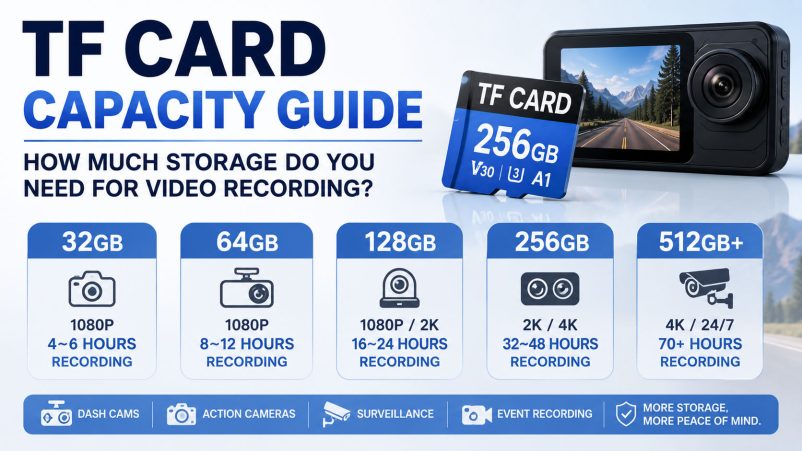
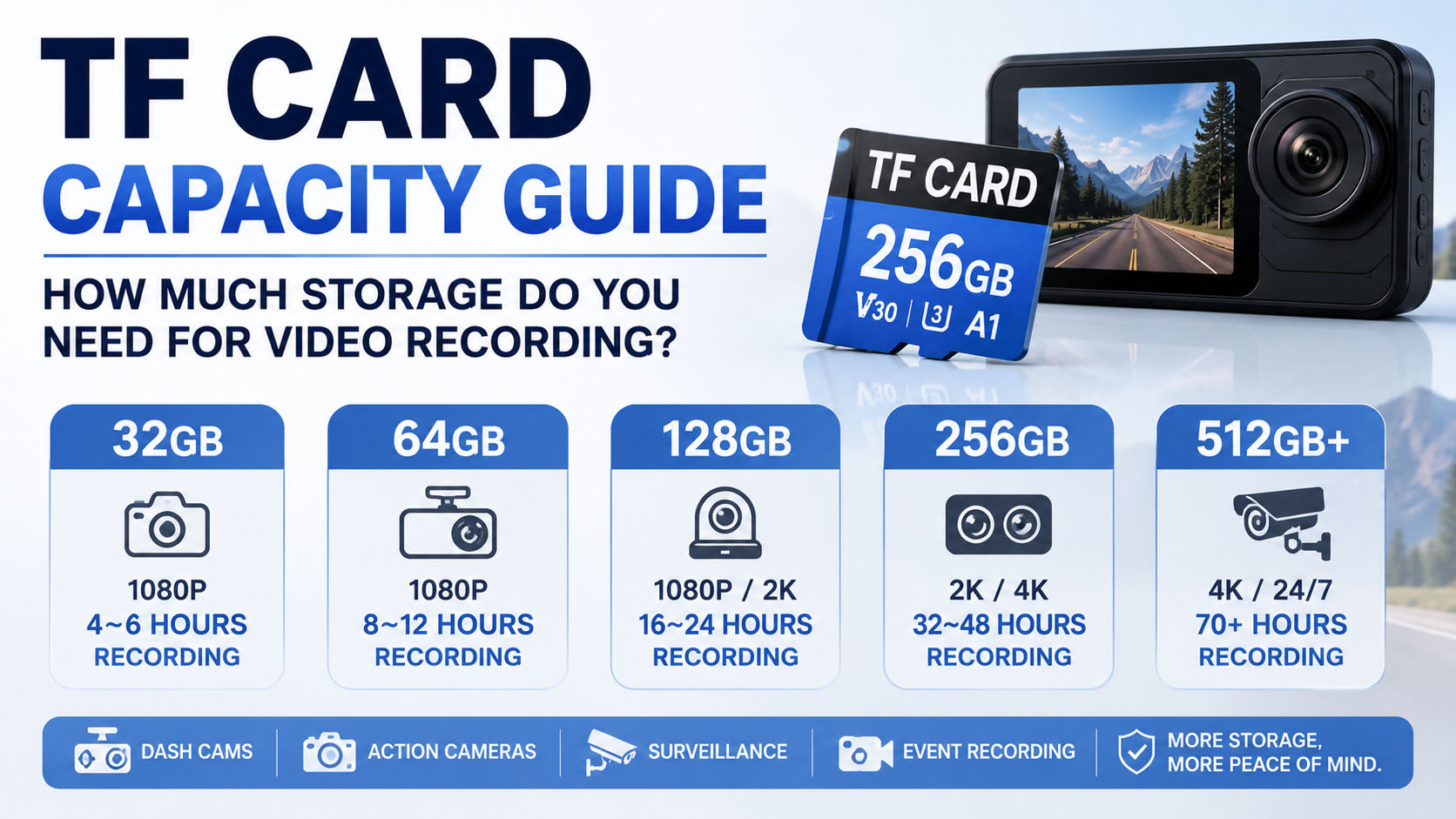
Choosing the right TF card capacity for video recording is not simply a matter of buying the largest card available. The ideal capacity depends on video resolution, bitrate, frame rate, compression format, number of cameras, recording duration, and whether the device uses continuous or loop recording.
For consumers, the most common options are 64GB, 128GB, 256GB, and 512GB TF cards. For B2B buyers, however, capacity selection also needs to consider device compatibility, NAND flash sourcing, controller configuration, endurance, supply stability, OEM requirements, and total cost.
This guide explains how much storage you need for video recording and how to select the right TF card capacity for dash cams, digital cameras, action cameras, CCTV, surveillance systems, body cameras, and other video devices.
Quick Answer: How Much TF Card Storage Do You Need?
As a general starting point:
| Video Application | Recommended TF Card Capacity | Main Consideration |
|---|---|---|
| Basic 1080P Recording | 32GB–64GB | Short recording time |
| 1080P Dash Cam | 64GB–128GB | Loop recording + endurance |
| 2K Dash Cam | 128GB–256GB | Bitrate + endurance |
| 4K Dash Cam | 256GB–512GB | High bitrate + endurance |
| Full HD Action Camera | 64GB–128GB | Recording duration |
| 4K Action Camera | 128GB–256GB | Bitrate + speed |
| 4K Camera | 128GB–512GB | Bitrate + sustained write |
| Home CCTV | 128GB–256GB | Recording hours |
| 4K Surveillance | 256GB–512GB+ | Continuous recording |
| Multi-Camera System | 256GB–1TB+ | Combined bitrate |
| Professional Video | 256GB–1TB+ | Resolution + codec |
Important: These are practical starting points, not universal requirements. The host device’s supported capacity and required speed class should always take priority.
The SD Association currently defines SDHC as over 2GB up to 32GB, SDXC as over 32GB up to 2TB, and SDUC as over 2TB up to 128TB.
What Determines How Much Video a TF Card Can Store?
The most important factor is not resolution alone.
Video storage requirements depend on:
| Factor | Impact on Storage |
|---|---|
| Resolution | Higher resolution generally creates more data |
| Bitrate | One of the biggest factors |
| Frame Rate | Higher FPS can increase data requirements |
| Codec | More efficient codecs can reduce file size |
| Compression | Higher compression generally reduces storage consumption |
| Number of Cameras | Multiple streams increase total storage |
| Audio | Adds additional data |
| Recording Mode | Continuous recording consumes more storage |
| File Format | Can affect file size and compatibility |
| Parking/Events | Additional recording increases storage usage |
This is why saying “128GB equals X hours of 4K video” without specifying the recording bitrate can be misleading.
The SD Association notes that video requirements vary with parameters such as resolution, frame rate, codec, and compression, making application-specific evaluation important.
The Most Important Factor: Video Bitrate
For estimating recording time, bitrate is usually more useful than resolution alone.
A simplified calculation is:
Storage per hour ≈ Bitrate × 3600 ÷ 8
For example, at a constant 20 Mbps:
20 × 3600 ÷ 8 = 9,000MB ≈ 9GB/hour
At 50 Mbps:
50 × 3600 ÷ 8 = 22,500MB ≈ 22.5GB/hour
Actual usable recording time will vary because of file-system overhead, audio, variable bitrate, formatting, and the device’s recording implementation.
Estimated Recording Time by Bitrate
The following table provides a useful planning reference.
| Bitrate | Approx. Storage / Hour | Approx. 64GB | Approx. 128GB | Approx. 256GB | Approx. 512GB |
|---|---|---|---|---|---|
| 8 Mbps | 3.6GB | 17.8h | 35.6h | 71.1h | 142.2h |
| 12 Mbps | 5.4GB | 11.9h | 23.7h | 47.4h | 94.8h |
| 20 Mbps | 9GB | 7.1h | 14.2h | 28.4h | 56.9h |
| 30 Mbps | 13.5GB | 4.7h | 9.5h | 19.0h | 37.9h |
| 50 Mbps | 22.5GB | 2.8h | 5.7h | 11.4h | 22.8h |
| 100 Mbps | 45GB | 1.4h | 2.8h | 5.7h | 11.4h |
| 150 Mbps | 67.5GB | 0.95h | 1.9h | 3.8h | 7.6h |
| 200 Mbps | 90GB | 0.71h | 1.42h | 2.84h | 5.69h |
These are theoretical planning figures using decimal capacity and a constant bitrate. Actual recording time can be lower.
32GB TF Card: Who Should Choose It?
A 32GB TF card is primarily suitable when recording requirements are relatively limited.
| Suitable Applications | Recommendation |
|---|---|
| Basic 1080P | ✓ |
| Short video recording | ✓ |
| Entry-level dash cam | ✓ |
| Occasional recording | ✓ |
| Long 4K recording | ✕ |
| 24/7 surveillance | Usually not ideal |
At 20Mbps, a 32GB card theoretically stores around 3.6 hours of video.
For users who regularly record for many hours, 32GB can require frequent overwriting or file transfers.
64GB TF Card: A Good Entry-Level Balance
A 64GB TF card is a practical choice for many Full HD applications.
It can be suitable for:
- 1080P cameras
- Basic dash cams
- Action cameras
- Short surveillance recording
- General video storage
At 20Mbps, 64GB provides approximately 7 hours of theoretical recording time.
| Application | 64GB Suitability |
|---|---|
| 1080P Camera | Excellent |
| 1080P Dash Cam | Good |
| 2K Camera | Depends on bitrate |
| 4K Camera | Limited |
| 24/7 CCTV | Limited |
| Long-duration recording | Limited |
128GB TF Card: The Popular All-Rounder
128GB is one of the most versatile capacities for video recording.
It provides a useful balance between:
- Storage time
- Product price
- Device compatibility
- Availability
- Physical card format
Typical applications include:
- 1080P dash cams
- 2K dash cams
- Action cameras
- Digital cameras
- Home security cameras
- Smartphones
- Portable devices
At 20Mbps, 128GB provides approximately 14 hours of theoretical recording time.
For many consumer and automotive products, 128GB is a strong starting point.
256GB TF Card: Better for 2K and 4K Recording
A 256GB TF card is particularly useful when longer recording time is required.
Typical applications include:
- 2K dash cams
- 4K dash cams
- 4K action cameras
- Security cameras
- Dual-camera systems
- Professional video recording
At 50Mbps, 256GB provides approximately 11.4 hours of theoretical recording time.
At 100Mbps, the theoretical capacity falls to approximately 5.7 hours.
This demonstrates why capacity should always be evaluated together with bitrate.
512GB TF Card: For Long Recording Sessions
A 512GB TF card is useful for applications where users need to record for long periods without changing cards or transferring files.
Potential applications include:
- 4K video
- High-bitrate cameras
- Professional recording
- Multi-camera systems
- Long-duration surveillance
- Advanced dash cams
- Fleet monitoring
However, not every device supports 512GB.
Before purchasing a 512GB TF card, confirm:
- Maximum supported capacity
- Supported SD/microSD standard
- File-system requirements
- Required speed class
- Firmware compatibility
The SD Association specifically notes that device compatibility should be checked because older devices may not support newer capacity standards.
1TB TF Card: Is It Necessary?
A 1TB microSD/TF card can be useful for specialized applications, but it is not automatically better.
It may be suitable for:
- High-bitrate 4K video
- Professional cameras
- Long-duration surveillance
- Large media libraries
- Multi-camera applications
- Specialized industrial systems
For mainstream dash cams and consumer cameras, 128GB or 256GB is often sufficient.
The key question is:
How much recording time do you actually need?
Capacity vs Recording Time: Quick Reference
| Capacity | 8 Mbps | 20 Mbps | 50 Mbps | 100 Mbps |
|---|---|---|---|---|
| 32GB | 8.9h | 3.6h | 1.4h | 0.7h |
| 64GB | 17.8h | 7.1h | 2.8h | 1.4h |
| 128GB | 35.6h | 14.2h | 5.7h | 2.8h |
| 256GB | 71.1h | 28.4h | 11.4h | 5.7h |
| 512GB | 142.2h | 56.9h | 22.8h | 11.4h |
| 1TB | 284.4h | 113.8h | 45.5h | 22.8h |
Approximate theoretical values. Actual recording time varies by device and recording format.
Does Higher Resolution Always Need More Storage?
Generally, higher-resolution video has the potential to generate more data, but resolution alone does not determine file size.
For example:
| Video Specification | Possible Storage Impact |
|---|---|
| 1080P | Lower than comparable 2K/4K configurations |
| 2K | Moderate |
| 4K | Higher |
| 4K + High FPS | Higher still |
| 4K + High Bitrate | Significantly higher |
| 4K + Efficient Codec | Can reduce storage requirement |
Two 4K cameras can produce very different file sizes because their bitrates and compression settings may differ.
Therefore, when calculating storage requirements, ask for the actual bitrate.
How Much Storage Does a 1080P Dash Cam Need?
For a typical 1080P dash cam, 64GB or 128GB can be a practical starting point.
| Dash Cam | Suggested Capacity |
|---|---|
| Basic 1080P | 32GB–64GB |
| 1080P Daily Driving | 64GB–128GB |
| 1080P + Parking Mode | 128GB |
| Front + Rear 1080P | 128GB–256GB |
| Long-Duration Recording | 128GB–256GB |
However, capacity is only one part of the specification.
For continuous loop recording, buyers should also prioritize:
High Endurance + Stable Sustained Write Performance + Temperature Resistance
A larger standard card is not necessarily better than a smaller high-endurance card for a dash cam.
How Much Storage Does a 2K Dash Cam Need?
For 2K recording, 128GB–256GB is a practical starting range.
| 2K Application | Suggested Capacity |
|---|---|
| Short Daily Trips | 64GB–128GB |
| Regular Daily Driving | 128GB |
| Parking Mode | 128GB–256GB |
| Front + Rear 2K | 256GB |
| Fleet Monitoring | 256GB+ |
The required speed class should also be checked.
For higher-bitrate video, U3/V30 may be appropriate when required by the dash cam.
How Much Storage Does a 4K Dash Cam Need?
For 4K dash cams, 256GB is a practical starting point for many long-recording applications, while 512GB can be useful when the device supports it.
| 4K Dash Cam Use | Suggested Capacity |
|---|---|
| Short Trips | 128GB–256GB |
| Daily Driving | 256GB |
| Parking Mode | 256GB–512GB |
| Dual 4K Cameras | 512GB+ |
| Fleet / Extended Recording | 512GB+ |
4K recording can consume storage quickly, particularly at high bitrates.
More importantly, the card should have sufficient sustained write performance and endurance.
How Much Storage Does CCTV Need?
CCTV storage requirements depend on:
- Resolution
- Number of cameras
- Bitrate
- Frame rate
- Recording schedule
- Motion detection
- Retention period
For example, a single camera recording continuously is very different from four cameras recording simultaneously.
| CCTV System | Typical Capacity Starting Point |
|---|---|
| Single 1080P Camera | 64GB–128GB |
| Single 2K Camera | 128GB–256GB |
| Single 4K Camera | 256GB–512GB |
| 2–4 Camera System | 256GB–1TB+ |
| Continuous 24/7 Recording | Higher capacity recommended |
For long-term surveillance, buyers should consider high-endurance memory cards designed for repeated recording and overwriting.
Storage Calculation for Multiple Cameras
For multiple cameras, total bitrate can be calculated approximately as:
Total Bitrate = Camera 1 Bitrate + Camera 2 Bitrate + Camera 3 Bitrate + …
For example:
| Camera | Bitrate |
|---|---|
| Front Camera | 20 Mbps |
| Rear Camera | 15 Mbps |
| Cabin Camera | 10 Mbps |
| Total | 45 Mbps |
At 45Mbps, the theoretical storage requirement is approximately:
20.25GB per hour
Therefore:
| Capacity | Approx. Recording Time at 45Mbps |
|---|---|
| 64GB | 3.2h |
| 128GB | 6.3h |
| 256GB | 12.6h |
| 512GB | 25.3h |
| 1TB | 50.6h |
This type of calculation is much more accurate than choosing capacity based only on camera resolution.
What Is the Difference Between Capacity and Speed?
Capacity answers:
“How much data can the card store?”
Speed answers:
“How quickly can the card read or write data?”
They are separate specifications.
| Specification | Meaning |
|---|---|
| 64GB / 128GB / 256GB | Storage capacity |
| C10 | Minimum Speed Class write performance |
| U1 | UHS Speed Class 1 |
| U3 | UHS Speed Class 3 |
| V30 | Video Speed Class 30 |
| A1/A2 | Application Performance Class |
| High Endurance | Designed for intensive repeated writing, depending on product |
The SD Association explains that Speed Class ratings are intended to communicate minimum sequential performance under defined conditions, which is particularly important for reliable video recording.
Does a Larger TF Card Mean Better Performance?
No.
A 512GB card is not automatically faster than a 128GB card.
Performance depends on:
- NAND flash
- Controller
- Firmware
- Bus interface
- Product architecture
- Speed class
- Host device
The SD Association notes that actual read/write performance is influenced by the card’s internal architecture, including NAND configuration and controller implementation.
Therefore:
Capacity ≠ Speed
and:
Capacity ≠ Endurance
Why Speed Class Still Matters
For video recording, capacity alone is not enough.
A card needs sufficient write performance to keep up with the video stream.
| Video Application | Common Speed-Class Direction |
|---|---|
| Basic HD | Class 6/10 depending on device |
| Full HD | C10/U1/V10 |
| Higher-Bitrate Video | U3/V30 |
| Demanding 4K | U3/V30 or higher |
| Professional High-Bitrate Video | V60/V90 or device-specific requirement |
The SD Association states that C10/U1/V10 are associated with HD to Full HD recording, while U3/V30 and higher classes support more demanding video workloads.
Always follow the camera or recording device’s specification.
Why High Endurance Matters for Dash Cams and CCTV
Capacity tells you how much data the card can store.
It does not tell you how well the card handles repeated writing.
Dash cams and surveillance systems often operate like this:
Record → Fill Storage → Delete Old Files → Record Again → Repeat
This repeated write/erase workload can be much more demanding than occasional photo storage.
For these applications, consider:
| Requirement | Importance |
|---|---|
| Capacity | High |
| Sustained Write | High |
| High Endurance | Very High |
| Temperature Resistance | High |
| NAND Quality | High |
| Controller | High |
| Compatibility | Essential |
A 128GB high-endurance TF card may therefore be more appropriate for a dash cam than a larger standard card that is not designed for continuous recording.
Capacity Selection for Different Video Applications
| Application | 64GB | 128GB | 256GB | 512GB+ |
|---|---|---|---|---|
| 1080P Camera | ★★★ | ★★★★ | ★★★ | ★★ |
| 2K Camera | ★★ | ★★★★ | ★★★★★ | ★★★ |
| 4K Camera | ★ | ★★★ | ★★★★★ | ★★★★★ |
| 1080P Dash Cam | ★★★★ | ★★★★★ | ★★★★ | ★★ |
| 2K Dash Cam | ★★ | ★★★★ | ★★★★★ | ★★★ |
| 4K Dash Cam | ★ | ★★★ | ★★★★★ | ★★★★★ |
| Home CCTV | ★★ | ★★★★ | ★★★★★ | ★★★★ |
| Long-Term Surveillance | ★ | ★★★ | ★★★★★ | ★★★★★ |
The ratings are practical guidance rather than a universal compatibility guarantee.
How to Choose Capacity for Loop Recording
Loop recording changes the capacity calculation.
Suppose a dash cam records:
20 Mbps
and uses a:
128GB TF card
The theoretical recording capacity is approximately 14 hours.
When the card becomes full, the dash cam may automatically overwrite older files.
In this case, the card’s capacity determines the retention window, not whether the camera can continue recording indefinitely.
| Capacity | Approx. Retention at 20Mbps |
|---|---|
| 32GB | 3.6h |
| 64GB | 7.1h |
| 128GB | 14.2h |
| 256GB | 28.4h |
| 512GB | 56.9h |
For important footage, however, users should export or protect critical files rather than relying solely on loop recording.
How Much Storage Is Needed for Parking Mode?
Parking mode can significantly increase the required storage capacity because recording may continue when the vehicle is parked.
A useful starting point is:
| Parking Mode Usage | Suggested Capacity |
|---|---|
| Occasional | 64GB–128GB |
| Daily Parking | 128GB–256GB |
| Long Parking Periods | 256GB+ |
| Continuous Monitoring | 256GB–512GB+ |
High endurance becomes especially important because parking mode can increase the frequency of write operations.
What Is the Best TF Card Capacity for 24/7 Recording?
For 24/7 video recording, there is no universal “best” capacity.
The correct capacity depends on:
Required retention time + total bitrate
For example:
| Total Bitrate | 24-Hour Storage Requirement |
|---|---|
| 5 Mbps | ~54GB |
| 10 Mbps | ~108GB |
| 20 Mbps | ~216GB |
| 30 Mbps | ~324GB |
| 50 Mbps | ~540GB |
| 100 Mbps | ~1.08TB |
These are theoretical calculations before accounting for practical overhead.
Therefore, a system recording at 20Mbps continuously for 24 hours should generally look beyond 128GB if it needs to preserve a full day’s footage.
How to Choose a TF Card for Professional Video Recording
Professional buyers should evaluate more than capacity.
| Factor | What to Check |
|---|---|
| Capacity | 128GB / 256GB / 512GB / 1TB+ |
| Speed | C10 / U3 / V30 / V60 / V90 |
| Sustained Write | Actual application requirement |
| NAND | Quality and sourcing stability |
| Controller | Performance and reliability |
| Firmware | Compatibility and storage management |
| Endurance | Important for repeated recording |
| Temperature | Important for automotive/outdoor use |
| Compatibility | Camera/device maximum capacity |
| Testing | Capacity + write + endurance |
| Supply | Long-term component availability |
NAND Flash Quality and Capacity Consistency
From a storage-industry perspective, capacity is not simply a number printed on the card.
A reliable TF card depends on the relationship between:
NAND Flash + Controller + Firmware + Manufacturing Process + Testing
NAND selection affects:
- Density
- Cost
- Performance
- Endurance
- Reliability
For B2B buyers, stable NAND sourcing is particularly important because changes in component supply can affect product consistency.
Why Supply Chain Matters When Buying TF Cards in Bulk
For individual consumers, the supplier’s upstream supply chain may not be visible.
For OEM and wholesale buyers, it can directly affect business performance.
A professional memory card supply chain can involve:
NAND Sourcing → Controller Matching → Firmware → Assembly → Testing → Quality Control → Packaging → Shipment
| Supply-Chain Advantage | Business Benefit |
|---|---|
| Stable NAND sourcing | More consistent batches |
| Bulk component procurement | Better cost control |
| Controlled production | Consistent specifications |
| Factory testing | Lower quality risk |
| Stable lead times | Better inventory planning |
| Long-term supply | Easier repeat orders |
| OEM integration | Faster product customization |
For distributors and brands, supply stability can be as important as unit price.
OEM TF Card Capacity Solutions
For businesses selling cameras, dash cams, CCTV systems, or consumer electronics, OEM capability allows the memory card to become part of the product ecosystem.
Typical OEM options include:
| OEM Item | Examples |
|---|---|
| Capacity | 32GB / 64GB / 128GB / 256GB / 512GB |
| Speed Class | C10 / U1 / U3 / V30 |
| Logo | Custom brand |
| Card Label | Custom artwork |
| Packaging | Box / blister / paper card |
| Barcode | Customer-specific |
| User Manual | Customized |
| Application | Camera / dash cam / CCTV |
| Testing | Customer-defined requirements |
An OEM customer could develop products such as:
128GB C10 High Endurance TF Card
256GB U3 V30 Dash Cam Memory Card
512GB High Endurance Surveillance microSD Card
This allows brands to build a storage product portfolio based on different applications and price points.
Why OEM Capacity Planning Matters
For an OEM project, selecting capacity should be based on the target device and actual user scenario.
For example:
| Product | Target Customer | Recommended Positioning |
|---|---|---|
| 64GB C10 | Entry-Level | Budget |
| 128GB C10 | Mainstream | Best Value |
| 128GB High Endurance | Dash Cam | Reliability |
| 256GB U3/V30 | 4K Video | Performance |
| 256GB High Endurance | Surveillance | Long Recording |
| 512GB U3/V30 | Professional Video | Large Capacity |
This gives brands a clearer product ladder.
How to Choose a Wholesale TF Card Supplier
When searching for a wholesale TF card supplier, don’t compare only the price per GB.
Use a broader procurement checklist:
| Evaluation Item | Key Question |
|---|---|
| Capacity | Can the supplier provide the required capacities? |
| NAND | What is the component source? |
| Controller | What controller is used? |
| Speed | What is the sustained write performance? |
| Endurance | Is the product designed for continuous recording? |
| Testing | Is actual capacity verified? |
| Compatibility | Can samples be tested in the target device? |
| MOQ | What is the minimum order? |
| Lead Time | How quickly can repeat orders be supplied? |
| OEM | Can logo and packaging be customized? |
| Quality | Is batch inspection available? |
| Supply | Can the same specification be maintained? |
How to Test TF Card Capacity Before Bulk Ordering
A professional buyer should verify samples before mass production.
| Test | Purpose |
|---|---|
| Actual Capacity Test | Confirm usable capacity |
| Sequential Write Test | Verify recording performance |
| Sequential Read Test | Evaluate transfer performance |
| Sustained Write Test | Check long-duration stability |
| Loop Recording Test | Simulate dash cam/CCTV workload |
| Device Compatibility | Confirm host support |
| Temperature Test | Evaluate harsh environments |
| Endurance Test | Evaluate repeated write/erase |
| Batch Consistency | Compare multiple samples |
For OEM projects, testing the card in the actual target device is especially important.
Common Mistakes When Choosing TF Card Capacity
Choosing the Largest Capacity Automatically
A larger card is not necessarily better if the device does not support it.
Choosing Based Only on Resolution
Two 4K cameras can have dramatically different bitrates.
Ignoring Speed Class
A large-capacity card still needs sufficient write performance.
Ignoring Endurance
For dash cams and surveillance, endurance can be more important than capacity.
Ignoring Device Compatibility
A 512GB card is useless if the host device supports only 256GB.
Comparing Only Price per GB
A cheaper card may have different NAND, controller, endurance, or testing standards.
Buying Without Sample Testing
Bulk purchasing without qualification creates unnecessary quality risk.
FAQ: TF Card Capacity for Video Recording
How much storage do I need for 1080P video?
For many 1080P applications, 64GB or 128GB is a practical starting point. The actual recording time depends primarily on bitrate.
Is 128GB enough for video recording?
For many consumer cameras, action cameras, and 1080P/2K dash cams, 128GB can be sufficient. For high-bitrate 4K or long-duration recording, 256GB or 512GB may be more appropriate.
Is 256GB enough for 4K video?
It can be. At 50Mbps, 256GB provides approximately 11.4 hours of theoretical recording time. At 100Mbps, it provides approximately 5.7 hours.
How many hours of 4K video can 512GB hold?
There is no single answer because 4K recording bitrates vary widely. At 50Mbps, 512GB provides approximately 22.8 hours theoretically; at 100Mbps, approximately 11.4 hours.
How much storage does 1 hour of 4K video use?
It depends on the bitrate. At 50Mbps, one hour uses approximately 22.5GB. At 100Mbps, it uses approximately 45GB.
Is 128GB enough for a dash cam?
For many 1080P and 2K dash cams, yes. If the camera records 4K, uses parking mode extensively, or has multiple channels, 256GB may be a better choice if supported.
Is 256GB better than 128GB for a dash cam?
It provides approximately twice the storage capacity, but it is not automatically more reliable. For dash cams, compare capacity + high endurance + sustained write performance + temperature resistance.
Is 512GB too large for a dash cam?
Not necessarily, but compatibility is critical. Some dash cams support 512GB while others have lower capacity limits. Always check the manufacturer’s specifications.
Does a larger TF card record better quality video?
No. Video quality is primarily determined by the camera, bitrate, resolution, frame rate, codec, and recording settings. A larger TF card mainly provides more storage time.
Does capacity affect memory card speed?
Capacity and speed are separate specifications. A 256GB card is not automatically faster than a 128GB card. Actual performance depends on the card’s architecture, controller, NAND, interface, and speed class.
Is C10 enough for 4K video?
Not necessarily. For demanding 4K recording, U3/V30 or higher may be required depending on the device and bitrate. The SD Association associates U3/V30 with more demanding video recording applications.
Does a high-capacity TF card need high endurance?
Not necessarily. Endurance depends on the application. If the card is used for 24/7 recording, dash cams, or surveillance, a high-endurance design is generally more appropriate.
What is the difference between TF card and microSD card?
In modern consumer electronics, TF card commonly refers to the microSD form factor. Buyers should still verify the exact card type, capacity standard, and device compatibility.
What is the maximum capacity of a microSD card?
Under the SD standards, microSDHC supports over 2GB to 32GB, microSDXC supports over 32GB to 2TB, and microSDUC supports over 2TB to 128TB. However, the theoretical standard maximum does not mean every device supports those capacities.
Can I use a 512GB TF card in any camera?
No. The camera must support the relevant capacity standard and file system. Older devices may have lower capacity limits.
What capacity is best for a 4K camera?
For many 4K applications, 256GB or 512GB offers a useful balance between recording time and cost. Professional users with high bitrates or long shoots may need 1TB or more if supported.
What capacity is best for CCTV?
For continuous recording, 128GB–256GB can be a starting point for a single camera, while multi-camera and long-retention applications may require 512GB or more.
Can I order OEM TF cards in different capacities?
Yes. OEM memory card manufacturers can typically provide multiple capacity options such as 64GB, 128GB, 256GB, and 512GB, together with customized branding and packaging, depending on production capability.
What should I ask an OEM TF card manufacturer?
Ask about NAND source, controller, firmware, capacity verification, sustained write performance, endurance, temperature specifications, compatibility testing, MOQ, lead time, OEM packaging, quality control, and long-term supply stability.
TF Card Capacity Selection Cheat Sheet
| If You Need… | Start With… |
|---|---|
| Short 1080P recording | 32GB–64GB |
| Daily 1080P recording | 64GB–128GB |
| 2K dash cam | 128GB–256GB |
| 4K dash cam | 256GB–512GB |
| Full HD action camera | 64GB–128GB |
| 4K action camera | 128GB–256GB |
| 4K camera | 256GB–512GB |
| Home CCTV | 128GB–256GB |
| 24/7 surveillance | 256GB–512GB+ |
| Multi-camera recording | 512GB–1TB+ |
| Professional high-bitrate video | 512GB–1TB+ |
Final Verdict: What TF Card Capacity Should You Choose?
The best TF card capacity for video recording depends on one simple question:
How much video do you need to keep before the card is full or footage is transferred?
A practical guide is:
32GB–64GB → Short / Basic Recording
128GB → Mainstream Video Recording
256GB → 2K / 4K / Longer Recording
512GB+ → High-Bitrate / Long-Duration / Multi-Camera Recording
But capacity is only one part of a professional memory-card solution.
For video recording, also consider:
Capacity + Sustained Write Performance + Speed Class + Compatibility
For dash cams and surveillance:
Capacity + High Endurance + Sustained Write + Temperature Resistance
For B2B and OEM buyers:
NAND Quality + Controller + Firmware + Supply Chain + Testing + OEM Capability
The SD Association recommends matching the card’s speed-class and interface capabilities with the requirements of the host device, while also checking capacity compatibility.
For distributors, dash cam brands, camera manufacturers, CCTV companies, and private-label electronics businesses, the best TF card supplier should offer more than different capacities. A strong manufacturing partner should be able to provide stable NAND sourcing, consistent specifications, application-specific testing, competitive bulk pricing, customized branding, OEM packaging, and reliable long-term supply.
The right TF card is not the one with the most GB. It is the one that provides enough recording time, the required performance, reliable endurance, and full compatibility with the target device.




